Here you will find the information and materials you need for Weeks 6-10 of POLS0010.
Key Details

The module is also supported by Tie, Ricardo and Jamie who are our brilliant team of PGTAs that will be leading the seminar sessions. They offer their own drop in sessions (no booking required) for additional support outside of the seminars, they’ll let you know when they take place.
Keep an eye on the module announcements page for further updates and consult Moodle for key information about assessment submission etc.
Module Aims
This module aims to build skills in regression analysis using a variety of modelling techniques: linear, limited dependent, panel, time-series and longitudinal models. It also develops students’ skills in spatial data analysis and practical skills in data analysis of sample social surveys. Students will be proficient users of RStudio by the end of the module. The module teaches skills that students can apply across a range of jobs—in the public, private and third sectors. Emphasis is placed on using real-world data, ‘hands-on’ lab sessions, analysis, interpretation and visualisation.
The final 5 weeks of the module, set out here, is on the spatial analysis component.
Timetable
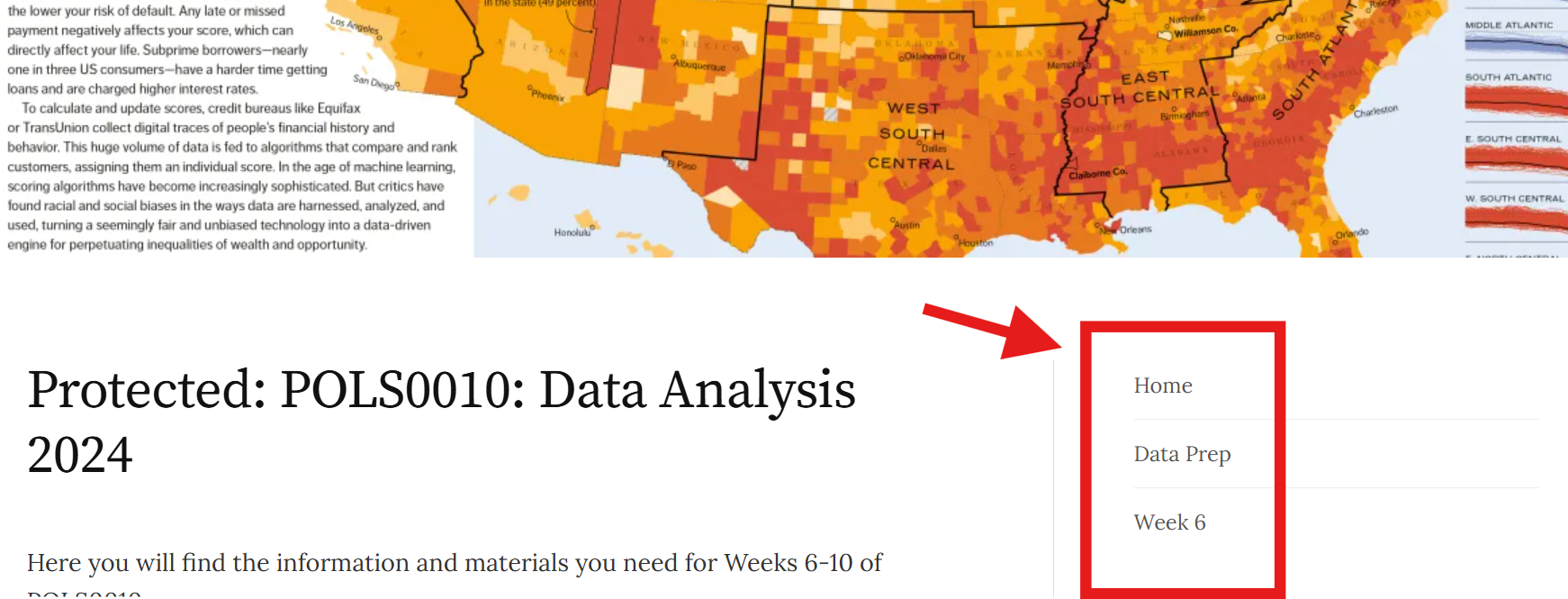
This website contains much of the content we will cover between now and the end of Term 1. I only expect you to complete the sessions that apply to each week. By all means read ahead if the content is available, but this is not required and materials will be edited/ updated up until the week they are due to be completed so you may miss something important if reading too far ahead. The material I’d like you to view is navigable by the menu on the top right (highlighted below). You will see some numbers at the bottom of each page for navigation – ignore these as they may take you to content still under development. Just stick with the navigation menu I’ve highlighted.
With the face to face content taking place on Mondays, you can then use the rest of the week to read up on the concepts/ content introduced and can come to the following week’s sessions armed with any questions you may have. We also have a lot of support in place throughout the week with PGTA office ours as well as those of James and Stephen. Please make use of these early and often, they will really help.
To access all recordings of the lectures click here (you need to go via Moodle).
Links to slides are provided with each week’s materials.
| Week Beginning | Theme | Lecture Activities | Seminar Activity | |
| 6 | 11th Nov. | Geographic Data & Methods | Introduction to Geographic Data | Spatial Data with R |
| 7 | 18th Nov. | Spatial Autocorrelation | Recap of Geographic Data; Finding Spatial Relationships in Data | Spatial Patterns & Relationships |
| 8 | 25th Nov. | Geographically Weighted Regression (GWR) | Interpreting Moran’s I; Why Do We Use GWR? | GWR |
| 9 | 2nd Dec. | Point Pattern Analysis | Interpreting GWR; Point Pattern Analysis Principles; Assessment 2 Set | Point Pattern Analysis |
| 10 | 9th Dec. | Advanced R | Advanced R; Module Recap | Advanced R |
| 13th January | Assessment 2 Due | Assessment 2 Due | Assessment 2 Due |
Assessment
As Stephen has set out, the term 1 assessment will be submitted in two equally weighted parts in terms of the word count and mark (i.e. 1,500 words each and 50% each of the total marks available for term 1). The second assessment will test the content introduced in this part of the module and is due 13th January.
Please include the word count at the top of the essay and submit your essay using your candidate number as the filename. Please check the Department of Political Science essay submission checklist and penalties for late submission and exceeding word limits. You will find useful guidance for writing and presenting essays on the Department of Political Science student website. These guidelines are designed to help you, and you should read them carefully and do your best to follow them. Good essays give clear and focused answers to the question asked, they have clear structures, and they will be adequately and appropriately referenced. They do not provide a vague and unstructured discussion of the topic.
Plagiarism is taken extremely seriously and can disqualify you from the module (for details of what constitutes plagiarism see http://www.ucl.ac.uk/current-students/guidelines/plagiarism). If you are in doubt about any of this, ask us or your personal tutor. This is a reminder that there are also very clear guidelines on the use of AI. See here.
Click here to see two past assessment examples. NOTE: I have removed the R code from them. One scored in the high 70s, the other in the mid 60s. I will talk through these in class.
Weekly Tasks
It’s fine for you to work together on the weekly tasks, they are not assessed but solutions will be posted or discussed in class. They have been designed to help with the coursework, which should be completed INDIVIDUALLY, so if you do work with others makes sure you have a complete understanding of what you are doing.
Getting Set Up
These materials have been designed to be as straightforward to access as possible. They are optimised for mobile so you can view on your phone easily. If you cannot access any content please let us know. The content is a mixture of videos, R code, descriptive text and links to additional resources. You can scroll through as well as link directly to each week.
RStudio & Data
RStudio Server. Click here to access.
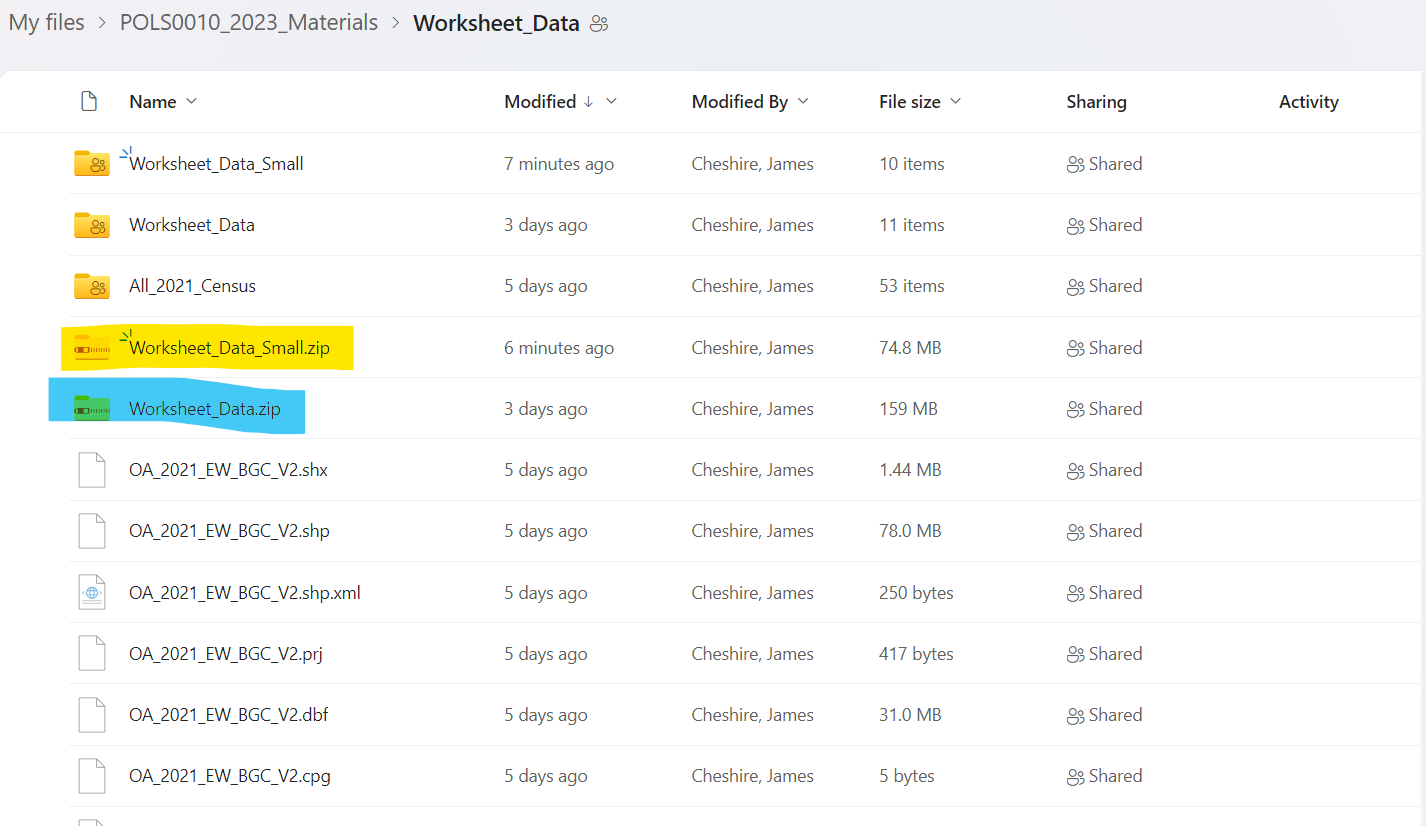
You will need to upload data from this folder to RStudio Server and or save on your machine.
The zip file you need to upload to RStudio is highlighted below. It is a smaller file which will upload to the server more quickly, but it lacks all the other census tables (we don’t need the missing ones in the practicals). The full file – in blue – may be helpful if you want the full data. The other files are the non-zipped version of the data we are using. There is more data in there than we will use in these exercises so be sure you keep an eye out for the folders used in each exercise by looking at the file paths in the R code when datasets are loaded in. If you uploaded the “_Small” file you may wish to rename this without the “_Small” so it matches the code I am using.
If you are having issues with RStudio please email: rc-support@ucl.ac.uk. This email is specific support for RStudio Server only, any other issues related to IT should go via the ISD helpdesk. Detail the issue you are having and they will get back to you.
Help/ Support
There are lots of opportunities for face to face support so please do take them (details at the top of the page). In addition, please also make full use of the forum on Moodle – this is a very efficient way of asking questions and it means everyone has the benefit of the answers. You can help each other out too! The forum for the final 5 weeks of the module is here.
Some tips for making the most of the forum when you ask a question:
1. Be efficient, but also be polite!
2. Be clear in the subject about what you are asking about. Don’t use “Final Task” and “Same Problem”, for example. This is going to get confusing fast for the tutors who teach multiple modules. For example “Projection Error with Spatial Points” or “Unable to load in csv file” is better.
3. Concisely outline the problem and also the steps you have taken to solve it. Explain what you are trying to do and why. This is really helpful for us to troubleshoot. With R the mistake you made might have happened a few lines of code before the one that is showing the error. We won’t know this without some extra context.
4. Include the code – a screenshot is fine but show the whole screen. There can be some useful clues in the console and objects list that we won’t see if you are showing only one line of code.
5. If we solve a problem acknowledge this with a reply! How will we know otherwise?
6. If you think you know the answer to someone’s question help them out!
7. If you are having a similar issue post to the forum – including what you have done to try and fix it.